Specifically, how it works and how to configure it on Cisco switches. This will be a multipart article.
In this first part I’ll go over what Spanning Tree Protocol (STP) is and why we need it. I’ll start with the last part first. To describe what STP is we have to discuss the problem for which it was created to solve. In larger networks there may be multiple paths a network packet could take from one point to another on a network. In the image below our scenario is that PC1 has just been connected to the network and is set to DHCP. Server1 is the network’s DHCP server. When PC1 comes online it will send out a broadcast DHCP Discover packet onto the network and into Switch1. When a switch receives a broadcast packet it will retransmit that packet out every port except for the port it was originally received. So Switch1 sends that packet out to Switch2, 3 and 4. Each of those in turn sends it out all of their ports (except for the originating port). So, to make this easier we’ll follow one path. PC1 sends a DHCP Discover packet and it follows this path: Switch1> Switch4> Switch3> Switch1> Switch3> Switch1> Switch3> Switch6> Switch4 and so on and on and on and on. Each time more and more traffic is generated on the network. This creates a network loop. Several loops, to be exact.
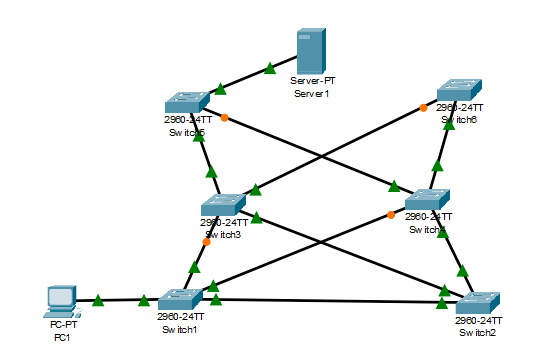
Also, when a switch receives an Ethernet packet it gets the Layer 2 MAC address info and documents that in it’s MAC address table. For example, it learns “MAC AA:BB:CC:11:22:33 is out FastEthernet 0/1” and it updates it’s MAC address table. Then, a split second later it receives a broadcast packet from that same originating MAC address on FastEthernet 0/22 and it updates it’s MAC address table. THEN immediately after that it gets that same broadcast packet from that MAC address on GigabitEthernet 0/2 and it updates it’s MAC address table once again. This goes on and on for every switch on the network until the network ports’ bandwidth and the switches CPUs are maxed out and the network comes to a screeching halt. Not a good thing when this happens during lunch and Karen in Accounting was wanting to catch up on her favorite show on Hulu. You know she’s going to be calling the Help Desk and complaining. It’s also a bad thing if it’s in the middle of the work day and people are trying to get work done of course.
Luckily, at least with Cisco switches, and I would imagine almost every other vendor worth their salt, Spanning Tree Protocol is enabled by default.
Ok, so now I hope you can see why we need STP. In the next article I’ll explain how Cisco switches work together to figure out how to solve this problem. It’s actually pretty interesting how they do it. ..and then it’s fun to turn STP off in Packet Tracer and watch the network come to crashing down.
Thanks for stopping by!
-Matt
 Matt Burks
One thought on “What is Spanning Tree Protocol (Part1)”